The spheres around the controller, laser emitters should not collide with other objects like laser emitter, laser it self, etc.
The spheres around the controller, laser emitters should only interact with specific objects.
Provide convinient ways to force objects only interact with designate controllers.
For usage, please check usage tab.
Usage of physical layers
LeftHandDirect: The layer for Left Direct Controller
Usage:
Every grabable object which you want to grab with left hand directly(without ray) should have Interaction layer mask set to LeftHandDirect. In this way, the object won't interact with other controllers.
LeftHandRay: The layer for Left Ray Controller
Usage:
Every grabable object which you want to grab with left hand with ray should have Interaction layer mask set to LeftHandDirect. In this way, the object won't interact with other controllers.
LeftHandEmitter: The layer for the ball where ray located on
Usage:
This layer is exclusively for the ray emitter in front of the left hand controller which is used to change the direction of ray. Other object should not be in this layer to avoid unneccesary physical collision.
LeftHandBody: The layer for the sphere covering left controller to change the length of the laser
Usage:
This layer is exclusively for the transparent sphere around the left controller which is used to change the length of ray. Other object should not be in this layer to avoid unneccesary physical collision.
RightHandDirect: The layer for Right Direct Controller
Usage:
Every grabable object which you want to grab with right hand directly(without ray) should have Interaction layer mask set to LeftHandDirect. In this way, the object won't interact with other controllers.
RightHandRay: The layer for the right hand ball where ray located on
Usage:
Every grabable object which you want to grab with right hand directly(without ray) should have Interaction layer mask set to LeftHandDirect. In this way, the object won't interact with other controllers.
LeftHandEmitter: The layer for the ball ray located on
Usage:
This layer is exclusively for the ray emitter in front of the right hand controller which is used to change the direction of ray. Other object should not be in this layer to avoid unneccesary physical collision.
RightHandBody: The layer for the sphere covering right controller to change the length of the laser
Usage:
This layer is exclusively for the transparent sphere around the right controller which is used to change the length of ray. Other object should not be in this layer to avoid unneccesary physical collision.
ScreenShots
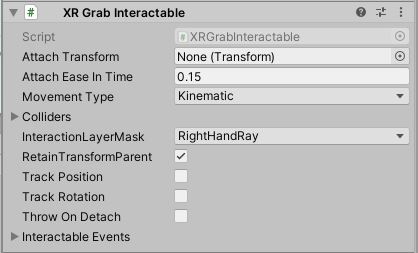
Below is the screenshot of the LeftControllerBody - the sphere around the left controller, which is used to change length of the ray. Its interaction layer mask tells us it only interacts with RightHandRay.
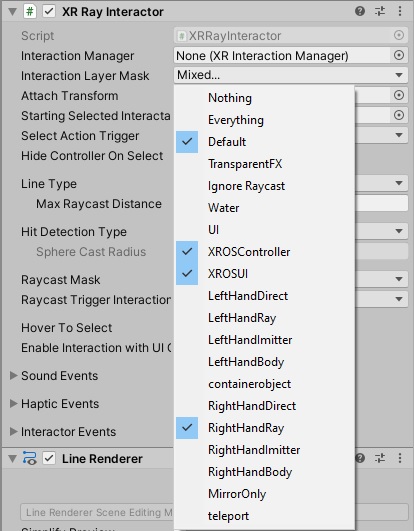
Below is the screenshot of the RightHandRay - the right hand controller of the user which emit the ray. If you want your object to interact with right hand ray, please make your object in those layers otherwise it will work.